Visual workflows. Invisible memory.
Dify lets you build AI applications from a visual canvas. Hebbrix adds the one thing Dify's built-in memory can't: memory that persists across users and sessions, and gets sharper on its own the more your workflow runs.
Memory wraps every workflow node
Use the Hebbrix HTTP node before any LLM call to inject context, and after any LLM output to store what was learned. No code inside Dify, only HTTP requests.
User input
Message arrives
Hebbrix search
HTTP node · context retrieval
LLM node
GPT-4 with context
Hebbrix store
HTTP node · save response
Output
Response to user
Both Hebbrix nodes are standard HTTP request nodes in Dify. No plugins, no code blocks needed.
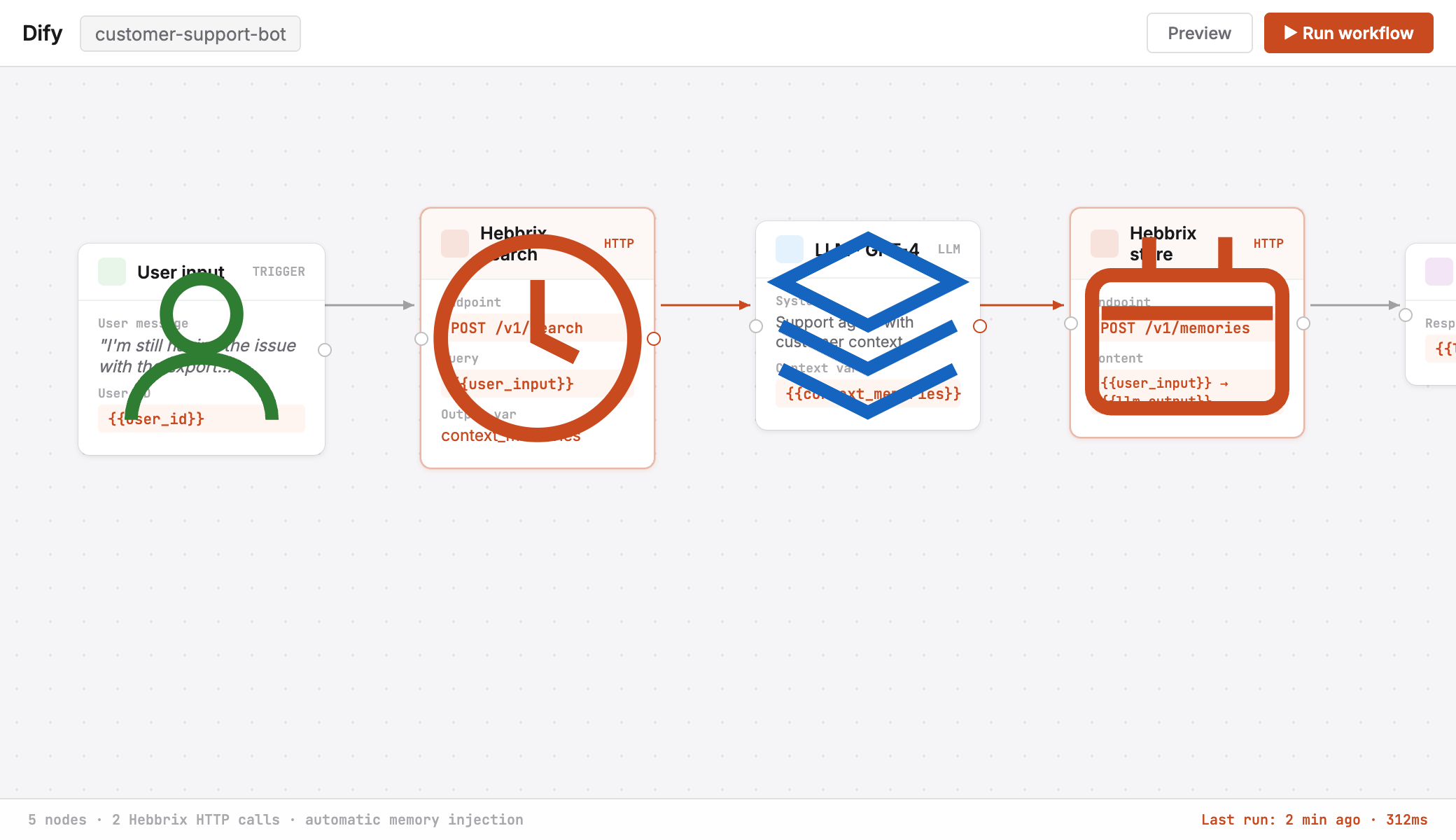
One to retrieve. One to store. That's the integration.
Before the LLM node
{
  "method": "POST",
  "url": "https://api.hebbrix.com/v1/search",
  "headers": {
    "Authorization": "Bearer {{API_KEY}}"
  },
  "body": {
    "query": "{{user_input}}",
    "collection_id": "{{user_id}}",
    "limit": 5
  }
}
// Pass result into LLM system prompt
// as context_memories variable
After the LLM node
{
  "method": "POST",
  "url": "https://api.hebbrix.com/v1/memories",
  "headers": {
    "Authorization": "Bearer {{API_KEY}}"
  },
  "body": {
    "content": "{{user_input}} → {{llm_output}}",
    "collection_id": "{{user_id}}"
  }
}
// That's it. Memory grows automatically.
// RL quality checks run in the background.Why not just use Dify's built-in memory?
Dify's memory is session-bound
Built-in conversation memory lives inside a single session. When a user starts a new chat, it's gone. Hebbrix memory persists indefinitely, across every session, every app version, every user interaction.
5-layer search, beyond recency
Dify retrieves recent messages. Hebbrix finds the most relevant memory no matter when it was stored, weighing semantic search, keyword matching, graph relationships, importance, and recency together.
Memory that learns and improves
After every workflow run, 6 RL quality checks evaluate whether the memories used actually helped produce a good response. The system gets smarter the more your workflow runs.
Add memory to your Dify workflows today
Two HTTP nodes. Ten minutes. Persistent memory for every workflow you've already built.